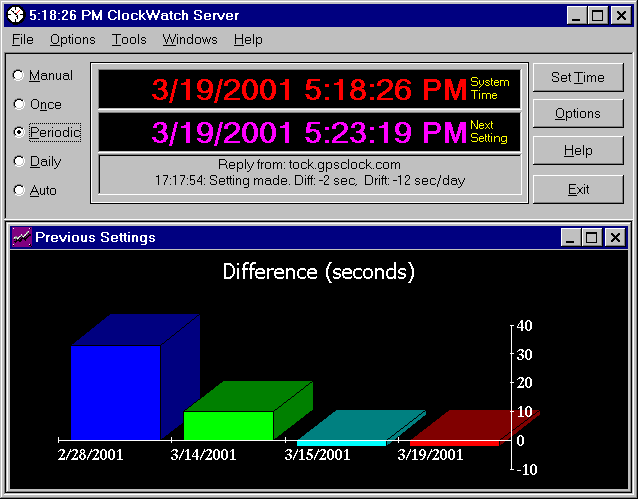
Main ClockWatch Screen |
ClockWatch Pro
(CW95)
$34.95

ClockWatch
Pro is a fully-featured time synchronization utility that allows you to
control setting frequency and automation, timeserver used, log results, use
Internet or modem connection, and integrates with our ClockCard product.
Pro is the ideal package for users who want the flexibility to tailor the
process and manage results.
System compatibility:
Windows
95/98/Me/NT/2k/XP/2003/Vista |
|
|
Due to deficiencies
in the original PC design, clocks in computers are notoriously inaccurate.
They can drift from several seconds to several minutes each day.
That drift in time can be anywhere from a simple annoyance to a major
issue.
ClockWatch keeps the time in your computer set
accurately by regularly comparing your system clock to the
"atomic" clock at the National Institute of Standards and
Technology (NIST), accessible over the Internet. ClockWatch
sets your computer's clock to within +/- 1 second of Coordinated Universal
Time (UTC) |
|
|
ClockWatch offers
you a variety of options for updating your computer's clock and managing
the information, ranging from a simple, hands-off approach to a closely-
managed process. In summary, these features include:
-
Makes your computer clock a precision time
keeper - synchronizes your clock with the US cesium atomic clock, the
world's
most accurate clock.
-
Keeps system clock accurate automatically -
just set it once and ClockWatch does the rest.
-
Ensures that your system clock doesn't drift over time,
and provides graphic display of your clock's performance
-
Options to set your clock manually or automatically
on a regular basis.
-
Connect using the Internet or direct modem dial-up,
plus other options.
-
The program may be run as a regular Windows
application, from a system tray, or from a command lines.
-
Online documentation, as well as free customer
support from Beagle Software.
Read more about
ClockWatch features
and benefits or
compare the different
versions of ClockWatch.
|

ClockWatch Pro Options |
ClockWatch Pro Options
· Settings
to
specify manual, automated, or periodic syncing.
· Display
options for main screen.
· Timeserver
selection and connection options.
· Logs
to
track time setting data.
· Graph
options for viewing results
· BIOS
Clock
updates Windows from motherboard clock.
· Service
lets
you run ClockWatch as a background service.
more on options...
|
|
|
|
|
|
- Download a free evaluation copy from our
ClockWatch Download page.
- ClockWatch can be ordered through our
online store
Call us! 1-612-370-1091 or
1-877-845-2549 (US & Canada toll
free)
|
|
|
For complete information see
ClockWatch Specifications.
Minimum requirements:
- Internet Connection
- Compatible with all standard Internet
Service Providers.
- A browser does not need to be active
for ClockWatch to function.
- Network Connection
- Date/Time Settings
- Correct time zone must be set in the
Windows Time/Date control panel.
|
|
 |
Free 30-day
Trial
Product Information:
Detailed Product Guide
User
Manual
Frequently Asked Questions
User and Editorial Comments
Support
Clock and Timekeeping Information:
More About Computer Clocks
More About Time and Time Standards
History of Timekeeping
ClockWatch Product Index
|
Questions?

|
For more
information on ClockWatch, please complete the
information request form. Or call us
toll-free at 1-877-845-2549 (or +1 612
370-1091 outside US) |