|
| |
Configuring
the Windows Firewall
The Microsoft Internet
Connection Firewall allows users to prevent unauthorized applications from
accessing your computer using communication ports into your computer.
In order for ClockWatch to communicate with timeservers you must allow
communication with the specified servers using the ports specified.
This describes how to configure the Windows firewall to allow time protocol
communication messages such as NTP and NIST between external timeservers and ClockWatch.
Windows XP
Windows Vista
Windows 7
Windows 8
Windows XP
Starting with Windows XP Service Pack 2 Microsoft offered an enhanced firewall that
restricts communication to external sites. These restrictions may
interfere with the normal operation of time synchronization products. You then
must explicitly allow communication through the ports used in communicating with
external timeservers.
|
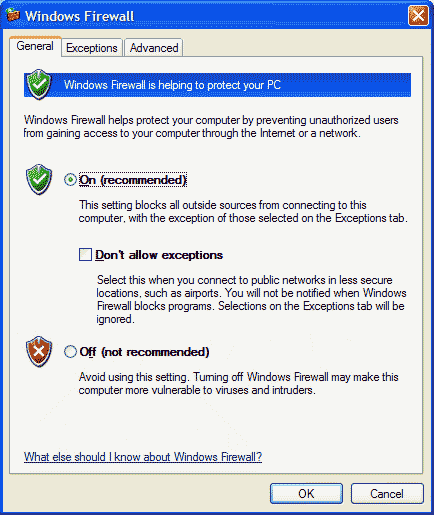
You must allow exceptions if your firewall is on
|
Open the firewall control panel.
To open Windows Firewall, click
Start, click Control Panel, and then double-click
Windows Firewall.
Confirm that exceptions are allowed, so the settings are set like this |
|
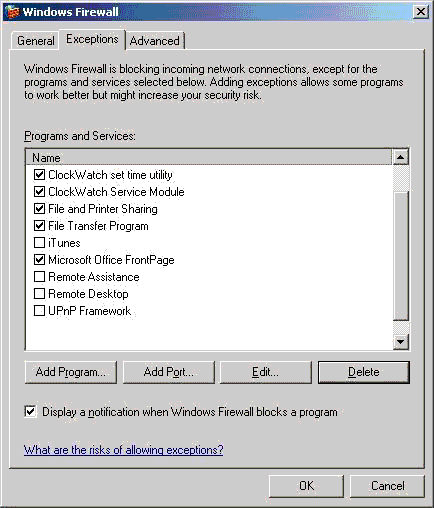
Note that we have already allowed the ClockWatch
Application and Service. In many ways this is a simpler way to allow the
ClockWatch timeserver to work. |
On the Exception tab click on 'Add Port'
An alternative method
would be click on the 'Add Program' to select the ClockWatch application
and ClockWatch Service.
|
|
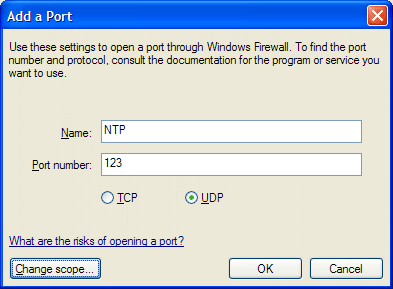
In this example we are adding a setting to allow NTP over port 123 using the UDP
communication protocol.
|
Name: Identify the port with the time protocol in use
(NTP, SNTP, NIST, Daytime or Time)
Port number, is based on the protocol used:
- NTP and SNTP use port 123 on time servers.
- NIST and Daytime use port 13
- Time uses port 37
Communication protocol, is also dictated by the time
protocol in use:
- NTP and SNTP use User Datagram Protocol (UDP) for
communication.
- NIST and Daytime use TCP
- Time uses either TCP or UDP
|
|
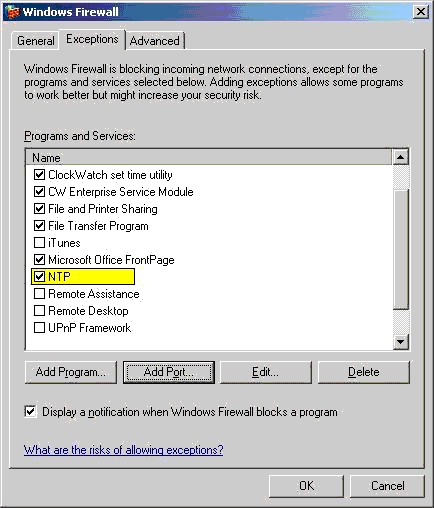
NTP time protocol communication is now permitted |
Press OK, and NTP should be now be allowed through the firewall. |
Windows Vista/Windows 7/8
This will show you how to add or remove ClockWatch as a
Windows Firewall program exception for each type of network location (ex:
Private or Public) that you use in Windows 7/8. Note that there are two
components in ClockWatch that may require access through the firewall, the
ClockWatch application (ClockWatch.exe) and the ClockWatch Service (CWSrvc.exe)
How to Add a Windows Firewall Rule in Windows 7/8
1. Open the Control Panel (All Items
View).
2. Click on the Windows Firewall icon.
3. Click on the Allow a program through Windows Firewall link in the left blue
pane.
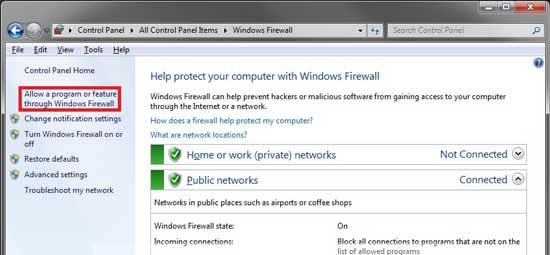
4. Click on the Change Settings button.
5. Create or Modify an Inbound Rule
On the left side, click the Inbound Rules section. This will show a list of
programs that have access (or have tried to communicate) through the firewall.
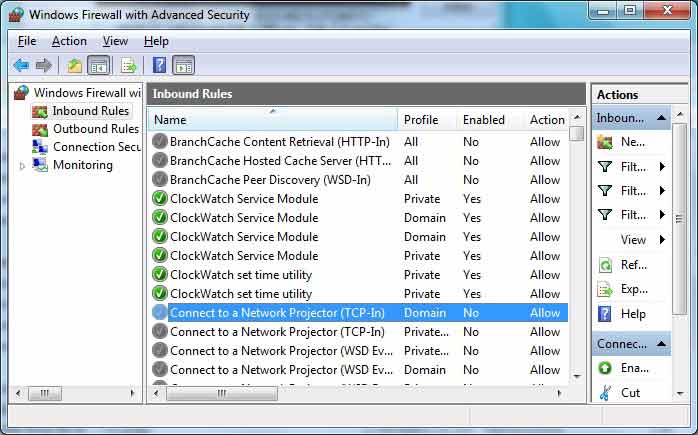
6. To Add a Rule and Allow Communication
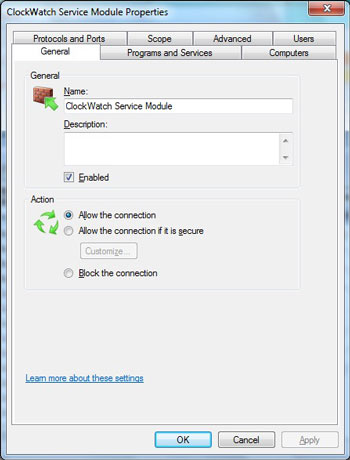 |
If ClockWatch is Listed as a rule -
Click on the program name (ClockWatch set time
utility or ClockWatch Service Module) to open the properties screen.
- Click on the Allow the connection radio
button.
- Verify the Protocol and Ports Settings
(below)
|
| |
|
|
| Check the Protocol and Ports tab |
|
|
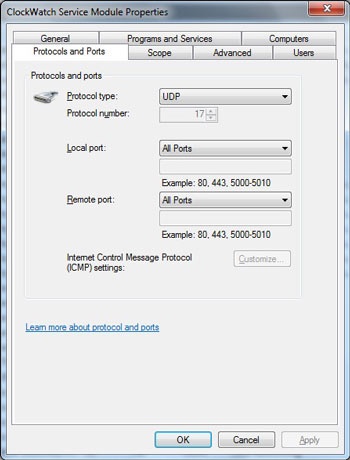 |
Ports are openings thought the firewall
used for communication. ClockWatch communicates to a timeserver using a
predetermined data exchange, called a protocol.
Protocol and Ports: Select the protocol and port with the time protocol in use
(NTP, SNTP, NIST, Daytime or Time)
Protocol type, is determined by the time
protocol in use:
- NTP and SNTP use User Datagram Protocol (UDP) for
communication.
- NIST and Daytime use TCP
- Time uses either TCP or UDP
Local and Remote Port number, is based on the protocol used.
Select All Ports or you can specify the individual ports used.
- NTP and SNTP use port 123 on time servers.
- NIST and Daytime use port 13
- Time uses port 37
|
| |
|
|
| If ClockWatch is not Listed as a rule |
|
|
 |
- Click on the New Rule button on the
right pane.
- Select Program
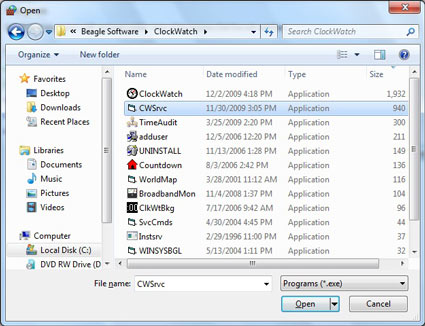
- Click on the Browse button. Navigate
to the program's exe file location, usually in a
C:\Program Files\Beagle Software\ClockWatch
folder, click on the ClockWatch.exe file to select the
application or CWSrvc.exe to select the service. Click on
the Open button.
- Check Domain, Private and
Public to permit communication over the Internet and the LAN
- Give a descriptive name to the Rule, (i.e..
ClockWatch Service)
- Verify the Protocol and Ports settings
of the newly created rule (above)
|
| |
|
|
ClockWatch Firewall Page
ClockWatch Main Page
| | |